
Anyone who handles commercial orders knows the pattern: customers submit them in inconsistent forms. One person sends a short message—“Manager Zhang, Product A, 200 units, unit price 8, needed Friday.” Another sends a spreadsheet. Someone else photographs a quotation or attaches a scanned PDF. Inside the company, a person then has to retype every order into the operating system, slowly and with ample room for error.
This note records how I built an automatic intake tool that reads these arbitrary inputs, turns them into structured order records, and writes them into an online table shared by the team. The implementation was not the difficult part. The real problem was making the tool reliable enough to use in daily work. The design decisions and failures that shaped that reliability are the subject here.
All identifying project details have been removed. References such as “a company” and “a product” are intentionally generic. The method applies to any workflow that turns irregular input into orderly data, and every technical term is introduced in plain language for readers starting from zero.
The complete data flow
First, two terms. Structured data means a record divided into consistent fields—customer, product, and quantity each occupy their own cell—so it can be searched and summarized. A free-form message is unstructured. The tool’s job is to turn an unstructured order into a structured record.
The second term is multimodal model. “Multimodal” means that the model can process more than text; it can also inspect images. That makes a photographed quotation or scanned document a readable input rather than an opaque attachment.
The complete pipeline looks like this:
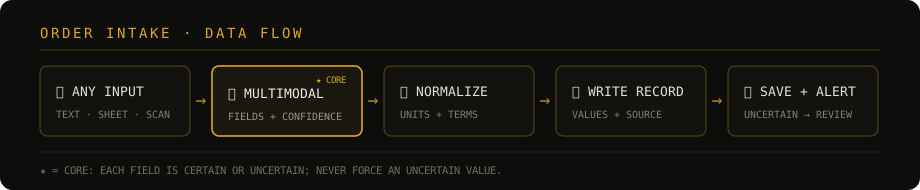
- Accept any supported format: text, spreadsheets, documents, images, or scanned PDFs;
- Parse multimodally: extract order fields and mark each field as certain or uncertain;
- Convert and normalize: bring units such as “kg” and “kilograms” into one agreed form;
- Write the record: store confirmed values while retaining the original text and files;
- Preserve and alert: flag uncertainty for review and notify a person.
The final record lives in an online multidimensional table—a cloud table that can act as a small database, a board, and a reporting surface at once. Several people can view, classify, and summarize the same records. AI performs only the intake step; viewing and collaboration remain the table’s responsibility.
The governing rule: prefer omission to invention
Before implementing any feature, I set one rule above all others: an empty field is safer than an invented value. If the model is unsure, it leaves the field blank and marks it for a person. It does not guess. A missing quantity is visible and can be completed; an incorrect quantity may pass unnoticed.
Five principles follow from that rule:
- Conservative by default: leave an uncertain field empty and flagged; never guess merely to complete the row.
- Preserve the source: store the original message and file with every record so the extraction remains traceable.
- Review by confidence: every field is certain or uncertain; one uncertain key field marks the entire order for review.
- Idempotent intake: submitting the same source again must not create a duplicate record.
- Failure stays local: log and skip one failed order, then continue with the next rather than stopping the entire batch.
Make the model return structured JSON with confidence
This is the central technique. The model is not allowed to answer in prose. It must return strict JSON—a machine-readable text format made of named keys and values. Each field carries both a value and a confidence flag (confident: true / false), forcing the model to state whether it considers that extraction dependable.
The instruction is approximately this:
You extract order information. Return JSON only, with no surrounding prose.
Each field contains value and confident:
{
  "customer_name": {"value": "", "confident": true/false},
  "product":       {"value": "", "confident": true/false},
  "quantity":      {"value": null, "confident": true/false},
  "unit":          {"value": "", "confident": true/false},
  "unit_price":    {"value": null, "confident": true/false},
  "source_excerpt": "source text retained for review"
}
Rules:
- If a field is absent, leave value empty and set confident to false.
- If it is ambiguous or has multiple interpretations, confident must be false.
- Normalize equivalent units to the agreed vocabulary.
Several small techniques made the result substantially more stable:
- Provide one or two examples. This is known as few-shot prompting: show a representative input and the exact output shape expected. The example acts as a pattern for the model.
- Set temperature to zero. Temperature is the control for output randomness. Data entry needs repeatability rather than creative variation.
- Normalize before storage. Define unit and naming conventions in the prompt instead of postponing every inconsistency to a later cleaning pass.
- Parse defensively. A model may wrap valid JSON in a Markdown code fence or add a sentence around it. As a fallback, isolate the text from the first
{to the final}before parsing, rather than rejecting an otherwise usable record.
- One Boolean value turns model uncertainty into a signal that software can read and route. It provides the missing middle between trusting every extraction and manually checking every field.
A gate between automatic writing and human review
Once every field carries a confidence state, a confidence gate can route the record:
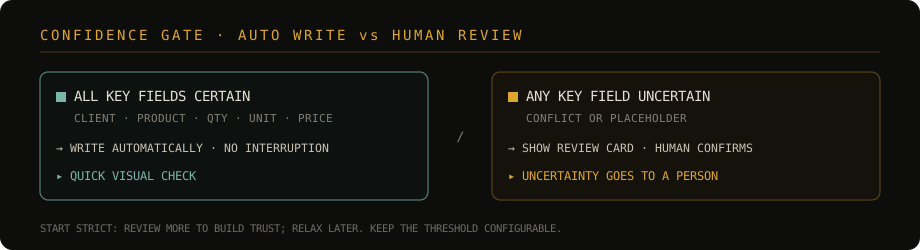
- When all key fields are certain, write the record automatically and show a quiet receipt containing the main values. The operator can glance at it without interrupting the next task.
- When any key field is uncertain, show a review card. Highlight the uncertain fields and provide inputs for corrections; display the certain values as editable context. The record is written only after a person confirms it.
“Key field” is deliberately narrow: customer, product, quantity, unit, and unit price. An uncertain note or secondary contact detail should not necessarily stop the flow; it can be completed later. If every minor imperfection creates an interruption, the automation no longer saves attention.
- At launch, deliberately send more records to review. Frequent confirmation builds evidence that the system behaves correctly. Relax the gate only after repeated use establishes trust.
- Keep that strictness as a configuration value, so the threshold can change without modifying application code.
An intentionally simple interface for non-technical staff
The underlying engine can process a batch without supervision, but its daily user is an operator who should not need to understand the code. I therefore placed a chat-like web interface above the engine. The user types a message or drags in a file; the system parses it immediately, stores the certain record, and asks only when something needs clarification.
The boundary decisions matter more than the number of features:
- Keep staff away from the command line. A desktop shortcut starts the service and opens the intake page. The user’s workflow is reduced to double-clicking, typing, and dropping files.
- Reuse rather than rewrite. The interface calls the tested parsing, conversion, and storage functions directly. Duplicating that logic for the interface would create two implementations that eventually disagree.
- Exclude dangerous capabilities deliberately. A single-user workstation does not need login machinery or open-ended conversation, and the intake interface receives no ability to modify code, delete files, or execute commands. A narrower tool is harder to break accidentally.
- For a tool used by non-technical colleagues, what it cannot do matters as much as what it can do. Removing dangerous capabilities is more dependable than asking people not to click the wrong thing.
Reading multiple formats: route first, then combine
“Any format” becomes manageable when divided into two paths:
- Formats with extractable text—plain text, spreadsheets, documents, and PDFs with a text layer—are converted to text and sent to a text model, which is generally faster and less expensive.
- Formats without extractable text—images and scanned PDFs—are rendered as images and sent to the multimodal model. A PDF that returns no text is usually a scan and belongs on this visual path.
A common order also arrives in pieces: one explanatory message plus several attachments. Those sources should be interpreted as one combined order, under two rules:
- If the message conflicts with an attachment, treat the written instruction as primary and the file as supporting evidence.
- Set an upper limit on images per request. When the order exceeds it, process only the supported subset and require human review rather than allowing an oversized request to fail or omit content silently.
Divide work between the model and the person
Seen as a whole, the tool is a division of labour:
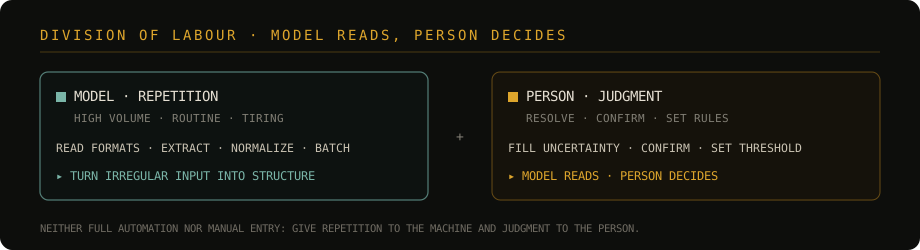
- The model handles repetition: reading different formats, extracting fields from irregular text and images, normalizing units, and processing batches.
- The person makes decisions: resolving uncertain fields, confirming the final record, and setting the rules and confidence threshold.
This is neither complete AI automation nor manual entry with an AI decoration. It is a deliberate split: repetition goes to the machine; judgment stays with the person. The model reads, but the person decides.
Amendments, traceability, and duplicate prevention
Real orders change, and the intake path must preserve history while preventing duplicates:
- Amend an existing order: search by a generic pair such as customer and product, show possible matches, and let the person select one. A review card presents old value → new value, changes only the fields mentioned, and appends the amendment to a history log.
- Retain the source permanently: even an automatically written record stores its original message and attachment. Any value can be traced back to the material from which it was extracted.
- Make intake idempotent: idempotent means that repeating the same operation produces the same final state. A filename plus a content fingerprint prevents the same source from creating two records.
Deployment failures worth preserving
Moving a working tool from the development machine to the machine that will actually use it is often the hardest stage. These failures are broadly reusable warnings:
| Failure | Symptom | Response |
|---|---|---|
| Model endpoint not changed | Parsing fails after delivery, or image interpretation behaves differently | Development and delivery may use different model service addresses (base_url). Switch to the intended endpoint and retest images with a genuine multimodal model. |
| “AI extraction” columns in the online table | Quantities or prices written by the script disappear or change moments later | Some tables automatically reread source text and overwrite programmatic values. Use ordinary text columns for key fields and read-only formula columns for derived amounts. |
| Record and attachment written separately | Creating the record first and attaching files later triggers the overwrite above | Submit fields and attachments in one write operation rather than “create, then supplement.” |
| Corrupted launcher text | A double-click launcher fails because commands are split or misread | On systems whose regional settings are not Unicode-safe, keep .bat and .vbs launcher contents in plain English. Put localized interface text in the UTF-8 web page. |
| Cloud synchronization reads a partial file | The parser receives a truncated file and produces an incomplete record | A syncing file may exist before all its bytes arrive. Confirm synchronization or read important inputs from a reliable local directory. |
The final case is easy to miss: a partially synchronized cloud file can look complete in the folder while containing only part of its data. Moving a project between cloud storage and local machines is exactly where this quiet failure tends to surface.
Conclusion
The main lesson was simple: getting AI to interpret irregular input is no longer the difficult part; making the result dependable enough for real work is. Dependability did not come from a larger model. It came from conservative rules:
leave uncertainty empty, preserve the source, route by confidence, and keep final judgment human.
Models will continue to improve, but this contract can remain stable above them. The tool’s value is not the phrase “fully automatic.” It is the more practical division: give repetition to the machine and judgment to the person, so each side does the work it is suited to do.