
Rebuilding a company website looks, from a distance, like a matter of producing several pages. In practice, the durable work is a chain of decisions: what technology to use, where to host it, who controls the domain and accounts, and who will maintain it after launch. Interface design is only one part of the project; the choices made before and after it determine the long-term cost.
This account is written for readers without a web-development background. Each technical term is introduced in plain language, and every recommendation is attached to the condition that makes it reasonable. Identifying project details have been removed; the goal is to preserve the workflow, not the client.
The seven-stage process
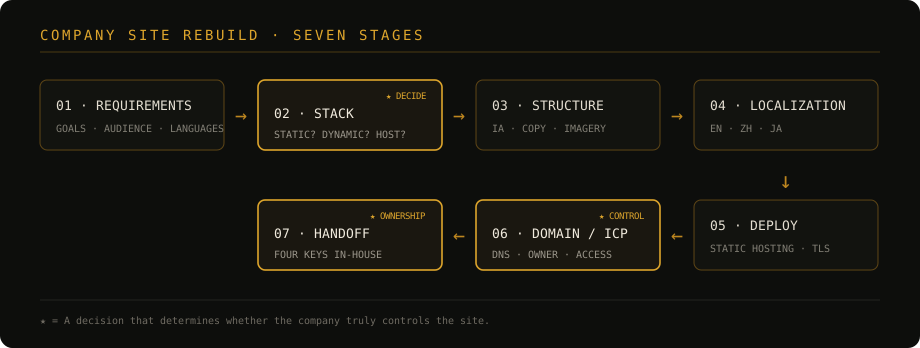
- Clarify requirements—audience, content, languages, and maintenance;
- Choose the stack—static or dynamic, and where it will run;
- Structure the content—information architecture, copy, and imagery;
- Localize deliberately—not only the article body, but the entire interface;
- Deploy—make a verified build publicly reachable;
- Connect the domain and complete any required filing;
- Hand over control—domain, DNS, hosting account, and source code.
The first five stages produce a website. The last two determine whether the company actually controls it.
1. Clarify requirements before choosing technology
Four plain questions prevent a large amount of rework:
- Who is the site for? A mainland-China audience and an international audience can imply different hosting and regulatory constraints.
- How often will the content change? A site revised a few times a year has different needs from one edited every day.
- How many languages are required? Localization affects routes, navigation, typography, images, and search metadata from the beginning.
- Who maintains it? A technical owner, an external vendor, and a non-technical office team need different editing workflows.
This stage contains no code, but it sets the conditions for every technical choice that follows. Selecting a stack before answering these questions is guesswork.
2. Choose between static and dynamic architecture
A static site is a collection of pages generated in advance. When a visitor arrives, the host sends those files directly. A dynamic site assembles a response at request time, usually using server-side code and a database. A CMS adds an editing interface on top of that dynamic system.
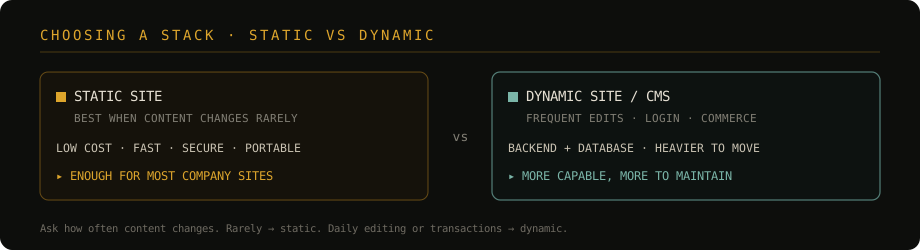
For a conventional company profile—about, services, products, and contact information—a static site is often the better default:
- there is no permanently running application server or database;
- files can be served quickly from a global edge network;
- the attack surface is smaller;
- the complete site is portable rather than tied to one platform.
A dynamic system earns its cost when the project genuinely needs frequent non-technical editing, authentication, transactions, personalized data, or complex editorial permissions. “More capable” is not the same as “more suitable.”
Ask how often the content changes and who changes it. Rare revisions favour a static build. Daily editorial work, accounts, or transactions may justify a CMS or custom backend.
3. Build the information structure before polishing pages
Once the architecture is settled, the next job is editorial rather than primarily technical:
- list every page and its hierarchy before designing navigation;
- keep important information within a short path from the home page;
- give each section one clear purpose;
- compress images before publication rather than relying on the browser to hide oversized originals;
- define typography, colours, spacing, buttons, and image treatment once, then reuse them.
Large unprocessed camera images are a common cause of slow company sites. Asset preparation is not a finishing detail: it is part of performance design.
4. Treat localization as product structure
Localization should be planned in the first version. A common model is to keep the default language at the root and use stable language prefixes for the others. Each page needs a known counterpart, and the language switch should lead to that counterpart rather than sending every visitor back to the home page.
The work includes more than body copy:
- navigation, labels, buttons, captions, validation messages, and metadata must be translated;
- language-specific line length and type choices need visual checking;
- diagrams containing text need localized versions;
- language metadata should be exposed to browsers and search engines;
- missing translations require an explicit fallback policy rather than an accidental mixture of languages.
Adding localization after the route structure and components are complete usually means reopening all of them.
5. Deploy the static site without pretending it has a backend
Static hosting can be as simple as publishing generated files to a service that distributes them over HTTPS. Object storage and edge-hosted static platforms both fit this model. A CDN caches files close to visitors; TLS supplies the encrypted connection represented by the browser’s lock icon.
The important caveat is forms. HTML alone cannot receive, store, and forward an enquiry. A static contact form therefore needs one of three deliberate solutions:
- A managed form endpoint, which receives submissions and forwards them to an email address;
- A serverless function, which runs only when a submission arrives and can validate, store, or relay the message;
- A plain email link, which is honest and simple but creates more friction for the visitor.
Avoid a form that merely opens the visitor’s mail application. It fails silently for many people—especially on devices without a configured local mail client—while looking as though the website accepted the submission.
Test the full contact path from an external device. A polished form that does not deliver a message is not a partial success; it is a broken feature.
6. Connect the domain and understand the hosting boundary
A domain is the human-readable address. DNS is the control layer that directs that address to a service. The registrar manages the domain registration; the hosting provider serves the website. These are separate roles and do not need to be the same company.
For a site served from infrastructure in mainland China, ICP filing requirements apply before public launch. Existing filing information is also associated with the access provider: moving an already filed site to another mainland provider generally requires access filing with the new provider. Using overseas infrastructure, including Hong Kong or Macau, does not use the mainland-server ICP access process, but mainland performance must be tested rather than assumed.
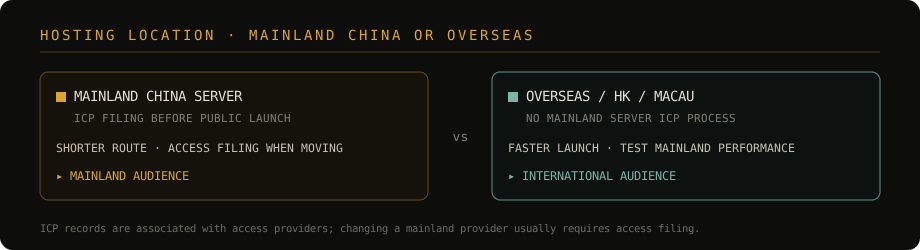
The durable decision is not “which provider is fashionable,” but which combination satisfies the audience, performance target, operating budget, and regulatory process. Domain registration and server location should not be confused: a domain can be registered with one company and hosted with another.
Filing requirements, provincial materials, and provider interfaces change. This section records the project’s decision model, not permanent legal advice. For an actual application, check the MIIT filing platform and the current instructions of the selected access provider.
The four keys to ownership
Possessing the page files does not by itself mean the company controls the site. Control is distributed across four account-level assets:
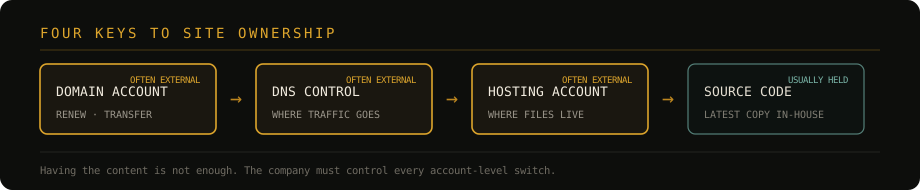
- Domain registrar account—who can renew, unlock, and transfer the address;
- DNS control—who can change where visitors are sent;
- Hosting account—where the deployed files and configuration live;
- Source repository—whether the company holds the current, reproducible source.
Source code is often the easiest asset to obtain. The first three are more likely to remain under a vendor’s personal or agency account, which creates avoidable dependence. The correct handoff is not a promise that “we will keep maintaining it”; it is a transfer into company-owned accounts, with the vendor receiving scoped access only when needed.
People may change and vendors may be replaced. The company account should remain the owner; collaborators should be invited into it, not the reverse.
7. Handoff and migration order
A complete handoff should include:
- the company-owned registrar account and domain certificate;
- verified DNS access and a record of current entries;
- the company-owned hosting account and billing owner;
- accurate filing data where applicable, maintained by a company-controlled account;
- the latest source, build instructions, environment notes, and asset licences;
- a short recovery note: who receives renewals, security alerts, and form submissions.
When moving providers, build and verify the new environment first. Keep the old one running, reduce DNS TTL if appropriate, switch DNS, verify the public routes and forms, and only then retire the old service. Migration should be reversible until the new path is proven.
Common failures
| Failure | Symptom | Better approach |
|---|---|---|
| Choosing a heavy CMS by default | Cost and maintenance without useful editorial value | Start from content frequency and permissions |
| A static form with no receiver | The submit button appears to work, but no message arrives | Add a managed endpoint or serverless function |
| Original-size images | Slow first load and excessive transfer | Resize and compress before publication |
| No HTTPS | Browser trust warnings | Issue a certificate and redirect to HTTPS |
| Stale CDN content | Visitors see an older release | Purge or version cached assets |
| Localization added late | Routes, navigation, and layout all need rework | Define locales and fallback rules in version one |
| Domain or hosting held by a vendor | Renewal and migration depend on another party | Transfer the four keys into company accounts |
| Filing records do not match current information | Access filing is returned for correction | Reconcile the subject, domain, contact, and access-provider records |
Conclusion
The later stages of a company website are less about visual production than about governance. Design tools can accelerate pages, and hosting platforms can automate distribution, but neither decides who owns the address or who can recover the system.
The final acceptance test is therefore not simply “the website opens.” It is: can the company renew the domain, change DNS, deploy a fresh build, and recover every account without depending on an individual vendor? When the answer is yes, the website has become a company asset rather than a rented arrangement.